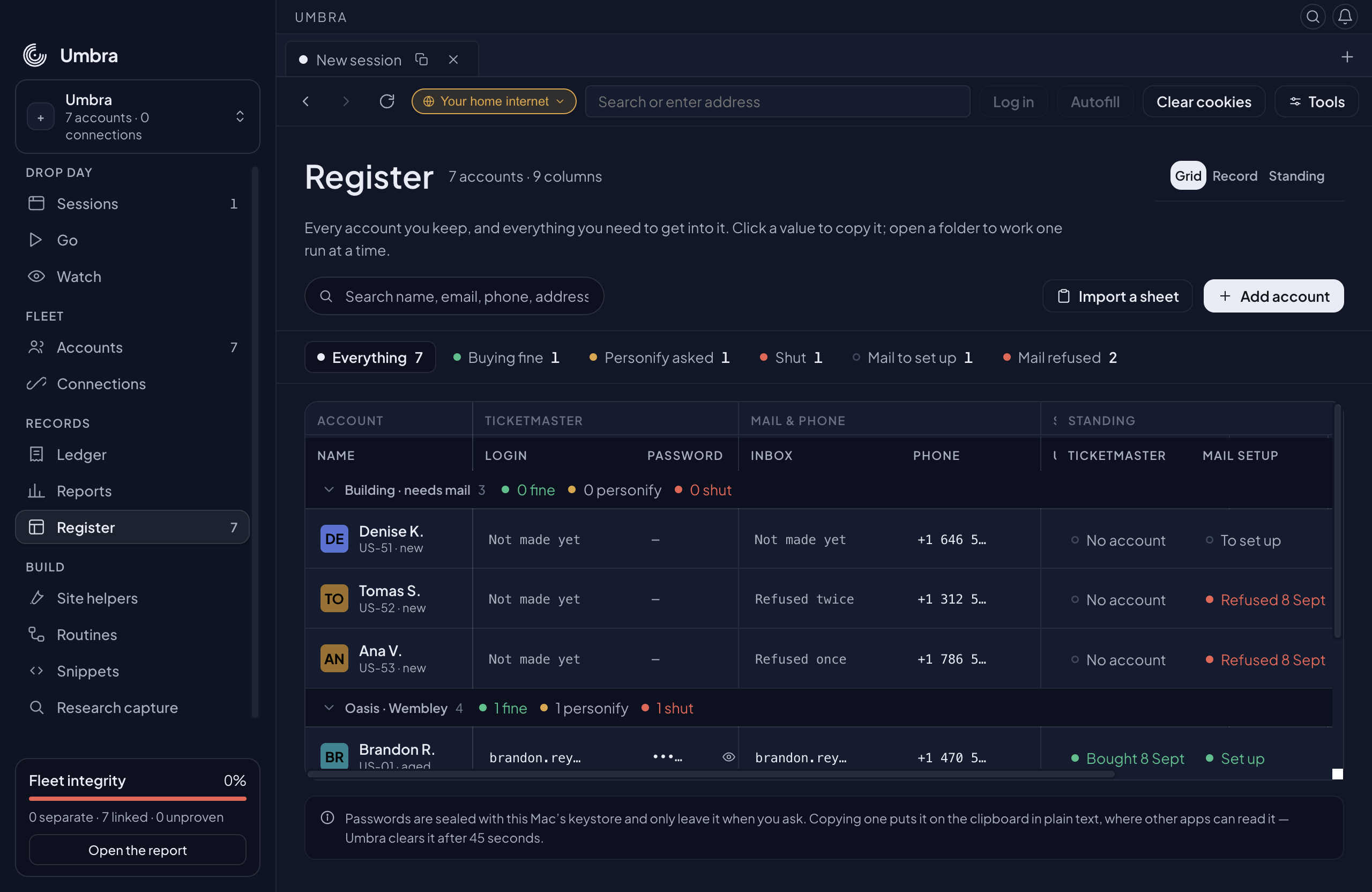
Every Account of record — sign-ins, address, exit, and what Ticketmaster currently does with it.
What it's for
The Register is your book of accounts of record — one page under Records that holds everything you need to get into an Account, and everything that has happened to it. The sign-in and inbox, the person and address a checkout asks for, the exit it browses from, and the two facts a spreadsheet on the side used to hold: what Ticketmaster currently does with this account, and whether its inbox exists yet.
It is the page you open when you have hundreds of Accounts at different stages — some buying, some asked for verification, some still waiting on an inbox — and need to see which is which without opening any of them.
Nine columns banded into four ideas. The name stays pinned on the left, the standing on the right, and everything between scrolls.shot-register · 7 Accounts across two folders, one bought, one asked for Personify, one shut, three still needing an inbox and two refused
Three ways to read the same book
The three views at the top of the page are the same Accounts, arranged for three different questions.
Grid
One row per Account, everything on one plane. Nine columns, banded into Ticketmaster, Mail & phone, Ships to, Connection and Standing. The name column is frozen to the left and the two standing columns to the right, so however far you scroll sideways you can still see who a row is and how it stands. Accounts are grouped into the folders you already file them in, and a folder shuts from its own row when you want one run at a time.
Record
The list of Accounts beside one Account in full — its Ticketmaster sheet, its Mail sheet, the person and address, the connection, and its history. This is where nothing is truncated, and where you change what an Account's standing is.
Standing
The same Accounts in lanes by what they need from you next: Mail to set up · Mail refused · Personify asked · Buying fine · Shut. Each card says what is in the way, in the provider's own words, and carries the one action that lane is for. Work a column down.
Click a value to copy it
Every value in the Register — a login, a phone number, a whole US address — is a copy target. Click it and it goes to your clipboard; the line under the page names what was copied.
A password is masked. The eye beside it shows it for ten seconds and then hides it again, and clicking the mask copies it without ever showing it. In the Record view, Copy the lot takes the whole address block — name, street, city, state, ZIP, country and phone — in the order a checkout form asks for it.
Bringing a sheet in
Import a sheet on the grid takes a CSV or TSV and creates an Account per row — the same importer the Accounts page uses, so nothing new can go wrong here that would not go wrong there. Columns are matched by name, in any order, and case, spaces and underscores are ignored: postal_code, Postal Code and Zip are the same column.
Who it is
Name, or First name and Last name together. A split name becomes "Hanna P." on the Account and the whole "Hanna Pfannerstill" in autofill, which is what a checkout form asks for.
The inbox
Email — the Account's inbox, and its Ticketmaster login until you save a separate one. A row that names an inbox arrives marked Set up, because an inbox in your sheet is an inbox you have.
How old the inbox is
Account creation date (or Created). The register stamps the inbox state with that date rather than the moment of the import, so the Account's history reads "Inbox made" on the day it actually was — a 2005 inbox does not arrive looking like it was made this afternoon.
Where it ships
Address, City, State, Zip or Postal code, Country, Phone. A two-letter country code is upper-cased for the country picker a checkout uses.
The rest
Password, Group, Buyer ID, Card Number, CVV, Startup URL — as on the Accounts page. Nothing is invented: a column your sheet does not have is left empty, and the Register shows it as a dash rather than a guess.
A vendor's export of bought inboxes usually carries no password, so those Accounts arrive with an inbox address and no inbox password — the Password cell reads a dash until you save one. The count at the end says what landed, and names what did not: rows the importer could not read, and rows over your licence's account limit.
Standing — what Ticketmaster does with this Account
A Ticketmaster account is rarely just "banned". The Register keeps the four states apart, because they need different things from you:
No account yet
There is no Ticketmaster account on this identity — a different thing from one nobody has checked.
Signs in and buys
It works. Where a buy is what proved it, the cell says so with the date: Bought 8 Sept.
Personify asked
Ticketmaster has asked for identity verification through Personify before this Account buys again. It still signs in — which is why this is its own state and not "shut". Dated, with room for where it happened ("At checkout, Oasis · Wembley").
Shut
Sign-in refused outright. The row stays in the book so its address, phone and payment label are never quietly reused by a new Account.
Set it on the Record view's Ticketmaster sheet, or from the card in the Standing view. Either way the change is dated and written into that Account's history.
Mail setup — and what the provider said
An identity with no inbox cannot have a Ticketmaster account, so the Register tracks inbox provisioning as a state of its own: to set up, set up, or refused. A refusal keeps the provider's message verbatim ("This username is already taken or unavailable") and counts the attempts, so the Inbox cell reads Refused twice rather than a blank. That is the difference between an Account nobody has tried and one that is fighting you.
History
Every standing change, every inbox change and every note you add lands on that Account's history, dated, on the Record view. A change that changes nothing writes nothing — a history of no-ops answers no question.