Routines
Record a sequence, edit it as blocks — and why it can’t reach a checkout.
What it's for
A routine prepares a Session so you don't have to steer it by hand: it opens pages, fills fields, reads text off the page and tells you what it found. It never presses a button — you commit. That one rule is what lets a routine do things a script can't: run on a schedule, or fan out across your whole fleet, unattended and still safe. And a routine stops the moment a step is not true — a failed step ends that Session's run and names itself in the result, rather than typing prepared data into whatever page happens to be showing; in a broadcast, only that Session stops and the rest carry on.
The page is a split: the editor on the left — numbered step rows you open with Edit — and on the right your Saved routines (each tagged Ready, or Blocked with its error count when the validator would refuse it today, plus when it last ran) and the Runs on card, which states where a routine runs, what starts it, and where it always ends.
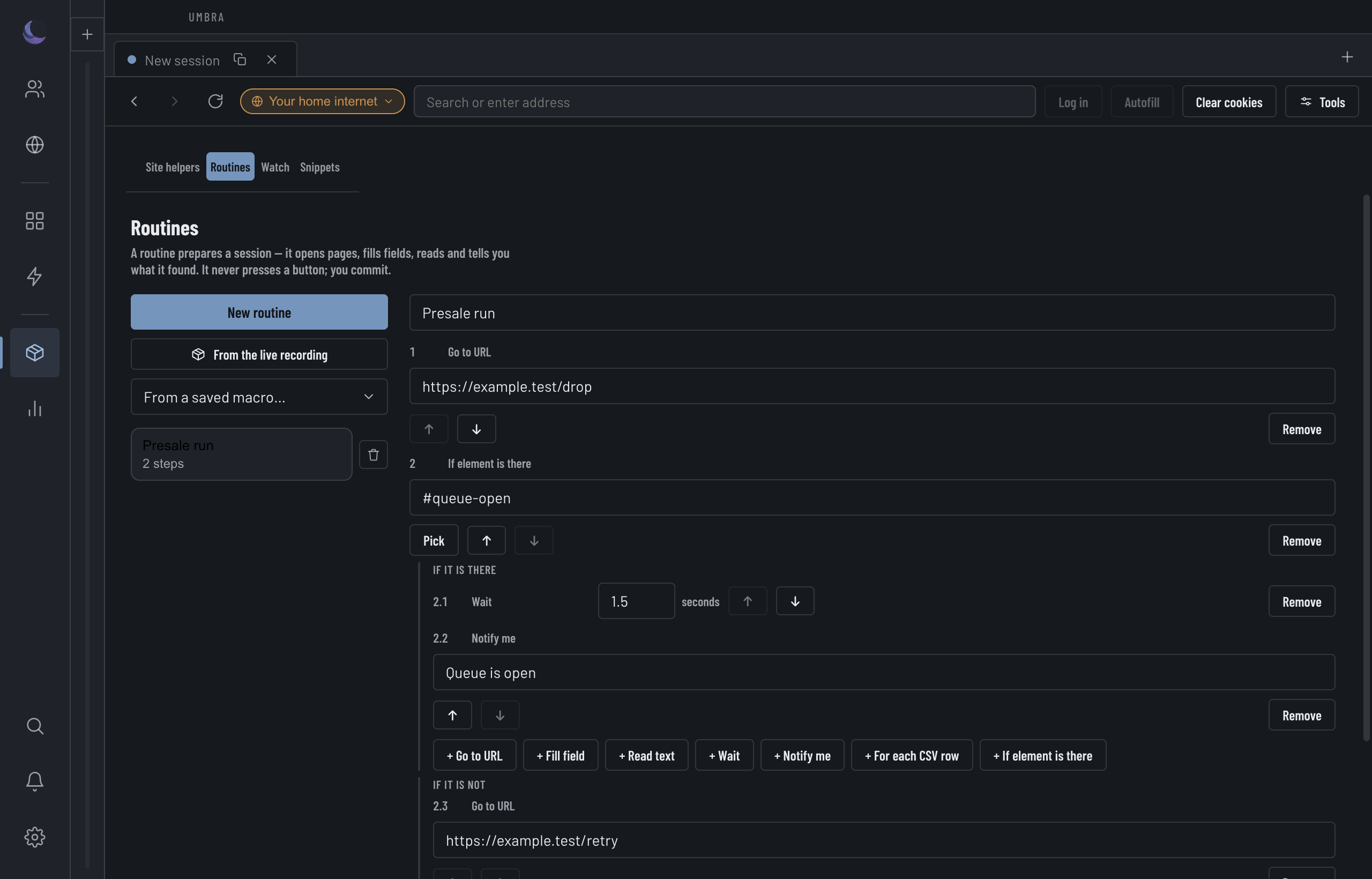
Start a routine
You can begin three ways — New routine in the toolbar, or the two sources under the Saved routines card:
New routine
Start blank and add step blocks yourself.From the live recording
Convert what the recorder has captured on the Session you have open — the mid-recording path. See recording clicks in Site helpers.From a saved macro
Open a macro you recorded earlier as editable routine blocks.Whichever you pick, a recording is converted, never silently trimmed. Converting drops the clicks — a routine can't hold a click — and the note at the top of the editor tells you how many went and which selectors they were, in plain words, rather than leaving you to wonder what changed.
Duplicate in the toolbar saves a copy of the open routine (through the same validation a save gets) and switches to it — duplicate-then-tweak is one motion. Run in the editor header runs the saved version in the Session you have open; it stays disabled until every issue the editor shows is fixed, for the same reason Save does.
The seven step types
A routine is built from a closed set of blocks. That the set is closed is the whole safety story, so it's worth reading once:
http(s) address.{name} to drop in a value you read.For Fill, Read and If element is there you can point at an element instead of typing a CSS selector: press Pick and click the element in the live page. Leaving the screen mid-pick disarms the page automatically, so a stray capture listener can't eat your next real click.
Why a routine is safe to run unattended
This is the point a script can't reach. A script is arbitrary JavaScript, so no scanner can prove what it will do. A routine is a closed type whose grammar contains no control-activating step at all — every block compiles to a navigate or a fill and nothing else.
Feeding a loop with a CSV
A For each CSV row step runs its inner blocks once per row of a file you attach. Load the CSV with the file button on the step; Umbra parses it (the renderer never does) and reports the row count, or says inline if the file had only a header and no data.
A CSV attaches by routine id, so on a brand-new routine the file is held and attached the moment you save — you don't have to save first. The loaded rows live in memory for this session only and aren't part of the saved routine, so an existing loop routine stays saveable after a restart even before you re-pick a file. The run is what needs data; the routine itself is still valid.
The limits, and what they're for
A routine's cost is measured over its loop expansion — a 30-second wait inside a 200-row loop is 100 minutes, not 30 seconds — so the caps below are the genuine worst case a routine can reach, not a per-step figure that a long list defeats.
Scheduling and deleting
Because a routine is safe to fire unattended, it can be scheduled to run at a set time or broadcast across a fleet — the fleet-wide list lives under Settings → All schedules. Deleting a routine cancels every schedule that ran it; the confirmation counts those pending runs before you agree, since a schedule lives on another screen and you'd otherwise meet the gap at the scheduled moment, on a drop.