Your first Account
Create an identity and prove it looks real.
What it's for
Your first Account is where the model becomes real: you name an identity, give it somewhere to browse from, and Umbra builds the device to match. Then — the part worth doing once so you trust it forever — you look at the proof that the disguise actually holds.
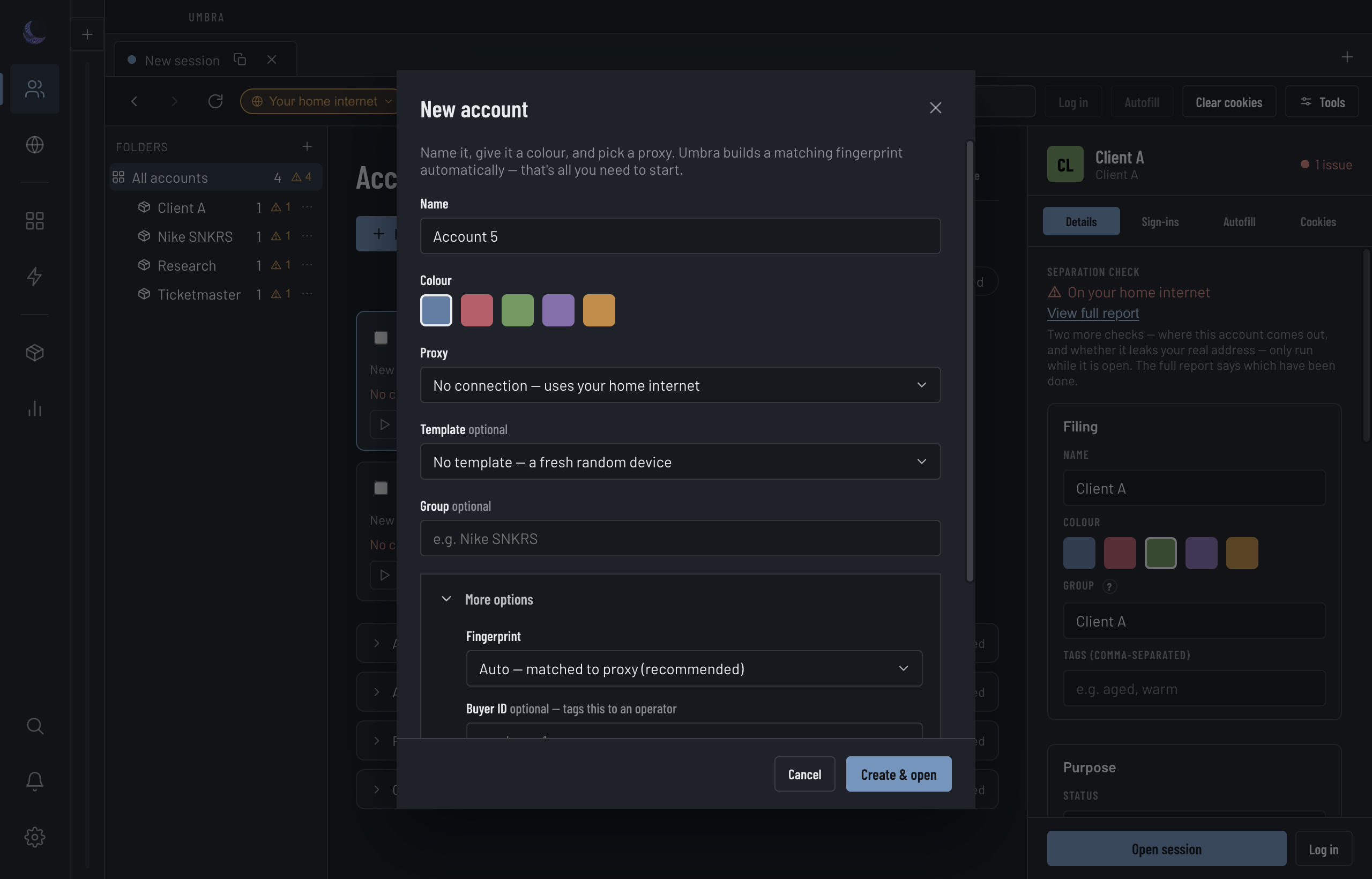
Create the Account
Name it and colour it
The colour isn't decoration — it's how you'll tell this Account apart at a glance everywhere in the app, so pick one you'll recognise under pressure.
Give it somewhere to browse from
The Proxy dropdown is grouped by who already exits where, because two Accounts sharing one exit is the hardest link to explain away. The default — No connection — uses your home internet — is a real choice, not a mistake, but an Account on your home connection isn't separated from you yet. A caution under the field flags a risky pick; it never blocks you.
Leave the Fingerprint on Auto
Umbra builds the device signature for you and matches it to the exit. You don't pick fonts or a graphics card; you pick desktop or mobile, and Auto — matched to proxy does the rest. A template is optional, and every Account gets a fresh canvas and audio seed, so Accounts from one template are never linkable to each other by Fingerprint.
Create & open
This makes the Account and opens it as its own Session. Everything past the four top fields — buyer ID, a start page, autofill, a saved sign-in — waits behind More options and is optional.
From then on the Account's row carries two Open buttons side by side: Open in Umbra (its Session inside the app) and Open in Chromium (the patched browser on this machine, for the buying itself — see Open in Chromium). Nothing has to be selected first. From the keyboard, Enter opens the focused Account in Umbra and Shift+Enter in Chromium.
What "Auto" actually aligns
The point of a matched Fingerprint is coherence: an Account that exits in Berlin should read as a Berlin machine. Umbra copies the region off the exit — but only off an exit it has actually tested.
Prove it worked
Umbra can show you the disguise from the outside. The first proof asks each question twice — once of the Session, once of your bare machine — and puts the answers side by side. Reading across a row is the whole argument: What a website sees should not match Your actual computer — except the shape of the connection, which should match, since both are real Chrome's handshake; that row passes only when the Session rode the engine.
Press Measure. Until you do, every row reads not checked and asserts nothing — an unmeasured row never borrows the colour of a pass or a leak.